
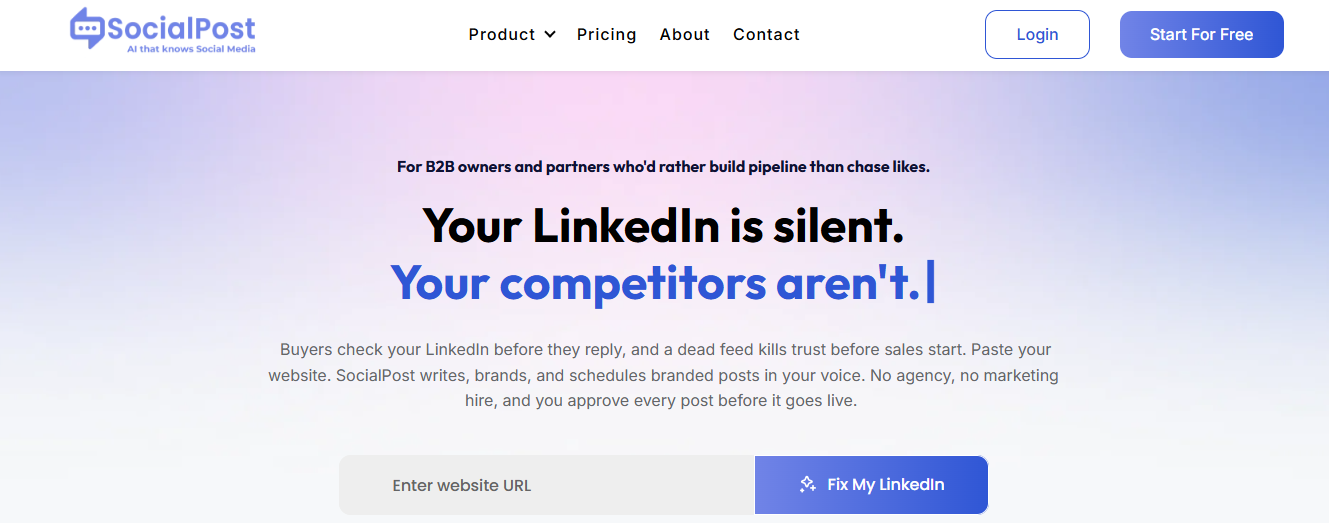
I’ll be upfront — I was skeptical when I first heard about SocialPost AI. I’ve tried a handful of “AI social media tools” before, and most of them just spit out a generic caption and call it done. But after using SocialPost AI for a few weeks on my own content (and for a couple of side projects I help manage), I think it’s actually worth talking about here.
Here’s my honest, no-fluff breakdown.
What SocialPost AI Actually Does?
The core idea is simple: you give it your website URL, and it analyzes your brand — your tone, your services, your existing content — and starts generating ready-to-publish social posts based on that. Instead of starting from a blank box and typing a prompt every time, it builds on what your business already says about itself.
This is different from most AI writing tools I’ve used, which just generate generic content based on whatever you type in. SocialPost AI tries to sound like your brand specifically, not like “AI brand voice #47.”
The Feature That Impressed Me Most
Honestly, the brand-matching is what got my attention. When I pointed it at a small business site I help out with, the captions it generated weren’t perfect right away, but they were noticeably closer to that business’s actual tone than anything ChatGPT gave me with a basic prompt. It picked up on specific services and phrases the business actually uses, instead of writing something generic that could apply to any company in that industry.
I also liked that nothing publishes automatically without approval. Every post goes through a review step where you can edit, rewrite, or just reject it outright. As someone who’s nervous about AI tools posting something embarrassing on a real business account, that review step matters a lot to me.
The design side is also genuinely useful. It pulls from a big library of stock photos and videos, lets you drop in your logo, brand colors, and fonts, and you don’t need any actual design skills to make something that looks put-together.
Where It Still Needs Work?
I want to be balanced here, because no tool is magic.
- The first batch of posts usually needs editing. It’s a strong starting point, not a finished product. I always tweak wording to sound more like an actual person typing it.
- For very niche businesses, it sometimes misses specific details that only someone in the industry would know. I had to manually correct a couple of factual details about services offered.
- Like most AI tools, it works best when you already have decent content on your website for it to learn from. If your site is thin or outdated, the output reflects that.
How Social Media Posters Can Actually Use This?
If you’re someone managing social media for a small business, a freelance client, or even your own personal brand, here’s how I’d suggest using it:
- Use it to break the “blank box” problem. The hardest part of social media isn’t writing — it’s staring at an empty post box wondering what to even say. SocialPost AI gives you a real starting draft instead of nothing.
- Use it for consistency, not creativity. If you’ve ever gone quiet for a month because life got busy, this is the tool that keeps a basic posting rhythm going without it feeling like a chore.
- Always review before publishing. Even though the tool is good, I treat every post like a rough draft from a junior assistant — helpful, fast, but needing my final eyes before it goes live.
- Combine it with your own voice and stories. The AI is great at structure and brand-matching, but the personal touches — a specific customer story, a recent win, an actual opinion — still need to come from you. That’s what makes posts feel human instead of automated.
- Use the free tier to test before committing. It has a free plan with real (not crippled) features, so you can actually try it properly before deciding if it’s worth paying for more channels or volume.
Who I’d Recommend This To?
Honestly, I think this tool makes the most sense for:
- Small business owners who know social media matters but don’t have time to write posts every week
- Freelancers or virtual assistants managing multiple client accounts
- Anyone who’s tried “just use ChatGPT” and found the output too generic to actually represent their brand
If you’re a large brand with a full marketing team and a very specific creative direction, you might find some of the automation a bit limiting. But for solo founders, small teams, or anyone drowning in content tasks, it solves a real problem.
Final Thoughts
I went into this expecting another forgettable AI wrapper, and came out mildly impressed. It’s not flawless — I still edit everything before it goes live — but it cut down the time I spend on the “starting from nothing” part of social media content, which honestly used to be the biggest time-suck in my week.
If you’ve tried SocialPost AI yourself, I’d love to hear how it compares to other tools you’ve used. Has anyone tested it for a longer stretch than a few weeks? Curious how it holds up over time.
SocialPostAI , AIToolReview , SocialMediaAI , ContentCreationTools , AIForSmallBusiness , SocialMediaMarketing , BrandVoiceAI , AIWritingTools , SocialMediaTips , ContentAutomation , AIForCreators , SocialMediaManagement , AIProductivityTools , BloggingTools
Great honest breakdown! I’ve had a similar experience with Buffer’s AI assistant and Predis AI, which feel like close cousins to SocialPost AI.
Predis AI was decent at generating quick captions and even basic carousel designs from a URL, similar to the brand-analysis approach you mentioned, but I found it less accurate at picking up brand-specific tone. It leaned more generic compared to what you described here.
Buffer’s built-in AI is more limited creatively, but it wins on the scheduling and workflow side since everything’s in one place: draft, review, and post without switching tools.
Like you, I never let any of these auto-publish. The review step is non-negotiable for me too, especially for client accounts. Sounds like SocialPost AI’s brand-matching might genuinely be a step up though, might give it a try after reading this.
@AlgoAuthor I haven’t used SocialPost AI yet, but after reading your experience, I got a better idea of what it offers. I think the best AI tool really depends on what kind of content we create and where we post it.
If someone is looking for alternatives, there are quite a few good options. ChatGPT is great for generating social media captions and post ideas. Claude is useful for writing longer and more natural-sounding content. Gemini works well if you already use Google Docs and other Google services. Canva AI is another good choice because it can create both social media graphics and captions in one place. For scheduling and managing posts, tools like Buffer and Publer are also worth trying.
In the end, I don’t think there is a single “best” AI tool. It’s always a good idea to test a few options and choose the one that fits your workflow, budget, and content style. Sometimes combining two simple tools gives better results than depending on one platform for everything.
Keyword Tags:
SocialPost AI,AI Tools,ChatGPT,Claude,Gemini,Canva AI,Buffer,Publer,Social Media Marketing,Content CreationI agree with the points shared by @LinkBlogs. SocialPost AI looks like a good choice if your main goal is creating social media posts quickly. But if we compare it with some of the other AI tools mentioned here, I feel each one has its own strength.
For example, ChatGPT is excellent for brainstorming ideas, writing captions, and even creating complete content calendars. Claude is great for longer, more natural-sounding content, while Gemini works really well if you’re already using Google’s ecosystem like Docs and Drive. If you also need graphics, Canva AI is a strong option because it combines design and AI-generated content in one place.
If I had to pick just one tool that outshines the rest for overall content creation, I’d choose ChatGPT. It is flexible, supports almost every type of writing task, and can help with everything from research and planning to editing and repurposing content. Of course, the best AI tool depends on your workflow, but for bloggers and content creators, ChatGPT is still my first choice because of its versatility.
SocialPost AI,ChatGPT,Claude,Gemini,Canva AI,AI Tools,Content Creation,Social Media Marketing,AI Blogging,AI Review