

One piece of source content can produce blog posts, YouTube Shorts, Instagram Reels, LinkedIn posts, X threads, and email newsletters using a structured AI repurposing workflow. Here is the exact prompt structure, output quality notes, and ROI calculation for each format in 2026.
Most content strategies have an efficiency problem that is rarely framed correctly.
The problem is not that creators are not producing enough content. The problem is that they are producing content once and distributing it once, then starting from zero for the next piece. Every new format requires a new creation cycle, which means time, cognitive load, and production cost multiply linearly with every additional channel you want to maintain.
AI breaks that linear relationship. One piece of source content, processed through a structured AI Content Repurposing Workflow, can produce output across six to eight distribution formats without requiring a proportional increase in creative effort.
This post maps that workflow precisely, including which AI tools fits best for AI content repurposing for all platform, what the output quality tradeoffs are, and how to build the system so it scales without becoming another thing you have to manage manually.
The Core Concept: Source Content vs Distribution Content
Before the workflow, the conceptual distinction worth establishing:
Source content is the full, researched, structured piece you create with complete depth. A 2,000-word blog post. A 45-minute podcast episode. A 15-minute YouTube video. This is where your original thinking, research, and editorial judgment live.
Distribution content is derivative. It takes the ideas, data points, arguments, and stories from source content and repackages them into formats optimized for specific platforms and consumption contexts.
The mistake most creators make is treating every distribution format as a new source content creation task. It is not. It is a transformation task, and transformation is exactly what AI handles most efficiently.
The Starting Point: Preparing Your Source Content for AI Processing
The quality of your repurposed content depends directly on how well your source content is prepared before you feed it to AI.
Before running any repurposing prompts, create what I call a content brief document for each piece of source content. This is a single document containing:
- The full text of the piece (or transcript if audio/video)
- The main argument or thesis in one sentence
- The three to five key supporting points
- Any statistics, data points, or quotes worth preserving exactly
- The target audience description
- Your brand voice notes (tone, style, what to avoid)
This brief becomes the input for every downstream repurposing prompt. It ensures consistency across formats and significantly reduces the editing work needed after AI generates each piece.
For audio and video content, transcription is the first step. Tools like Otter.ai, Descript, or Google’s transcription inside YouTube handle this efficiently. A clean transcript is functionally equivalent to a written piece for repurposing purposes.
Format 1: Blog Post (from Podcast or Video Source)
If your source content is audio or video, a long-form blog post is typically the first and highest-value repurposed format because it creates indexable text content from non-indexable source material.
Prompt structure:
“Here is a transcript from a [podcast episode/video] about [topic]: [paste transcript]. Rewrite this as a structured long-form blog post with an introduction, clear H2 headings for each main section, and a conclusion. Preserve all specific data points and quotes exactly. Target length: [word count]. Tone: [your brand voice description].”
Output quality notes: AI blog posts from transcripts require a specific editing pass for two things. First, spoken language patterns that read poorly in written form (filler phrases, incomplete sentences, conversational loops). Second, structural reorganization, since spoken content rarely follows the logical hierarchy that works best for written reading.
Budget 30 to 45 minutes of editing on a 1,500-word AI-generated blog post from a transcript. This is significantly less than writing from scratch but more than editing a post written natively in text form.
Format 2: YouTube Shorts Script (60-90 seconds)
YouTube Shorts rewards a specific structural formula: hook in the first three seconds, single focused point, clear ending that delivers on the hook’s promise.
Prompt structure:
“From this content: [paste brief], extract the single most counterintuitive or surprising insight. Write a 75-second YouTube Shorts script using this structure: hook statement (one sentence, provocative), problem context (two to three sentences), the insight explained simply (three to four sentences), actionable takeaway (one sentence). No filler. No intro. Start with the hook.”
Output quality notes: AI Shorts scripts tend to run long. Edit ruthlessly. Every sentence that does not directly serve the hook-to-payoff arc should be cut. The 75-second constraint is real: YouTube’s algorithm rewards completion rate and a 90-second video that loses viewers at 45 seconds performs worse than a 60-second video that holds attention to the end.
Format 3: Instagram Reels Script
Reels follows a similar structure to Shorts but with important differences in tone and pacing. Instagram audiences respond better to personality-forward delivery and visual cue descriptions.
Prompt structure:
“From this content: [paste brief], write a 45-60 second Instagram Reels script. Format it with [VISUAL CUE] markers where the scene or on-screen text should change. Tone should be direct and conversational, as if explaining to a friend. Start with a pattern interrupt, not a greeting. End with a question that invites comments.”
Output quality notes: The visual cue markers are important and most bloggers skip them, which produces Reels that are essentially talking-head videos with no editing variety. AI is reasonably good at suggesting scene cuts if you specifically prompt for them. The comment-bait ending is a distribution mechanic worth including: Reels with comment engagement in the first hour get significantly better reach in the algorithm.
Format 4: LinkedIn Post
LinkedIn rewards a specific format: short paragraphs, one idea per line, personal framing, professional lesson structure. The platform’s algorithm strongly favors native text posts over link-sharing posts, which means the goal is engagement on the post itself, not click-through to your blog.
Prompt structure:
“From this content: [paste brief], write a LinkedIn post using this structure: opening line that challenges a common assumption (no more than 12 words), two to three short paragraphs each making one point, a numbered or bulleted insight list (five to seven items), closing question. Maximum 1,200 characters. No hashtags in the body. Use line breaks aggressively for readability.”
Output quality notes: AI LinkedIn posts almost always need two specific edits. First, remove generic professional language (“in today’s rapidly evolving landscape,” “it is important to note”). Second, add one personal or specific detail that grounds the post in real experience rather than abstract principle. That specificity is what drives saves and shares on LinkedIn more than any other element.
Format 5: X (Twitter) Thread
X threads perform best when they follow a specific structural logic: hook tweet that works as a standalone, numbered body tweets that each contain a complete thought, closing tweet that synthesizes and drives action.
Prompt structure:
“From this content: [paste brief], write an X thread of eight to ten tweets. Tweet 1: hook that works standalone and creates curiosity gap. Tweets 2 through 8: one insight per tweet, each under 240 characters, numbered. Tweet 9: synthesis of the main argument in two sentences. Tweet 10: call to action or question. No thread emojis. No ‘a thread’ in tweet 1.”
Output quality notes: AI X threads consistently fail on tweet 1. The hook is almost always either too vague or too on-the-nose to create genuine curiosity. Rewrite tweet 1 manually every time. The body tweets are usually solid. The closing tweet often needs a more specific CTA than AI provides by default.
Format 6: Email Newsletter
Email newsletters require a different register than any of the above formats. The reader has explicitly opted in, which means the relationship is warmer and the content can be more direct and personal than social media content.
Prompt structure:
“From this content: [paste brief], write an email newsletter section of 200 to 300 words. Open with a one-sentence personal observation or question, not a summary of what the email contains. Deliver the main insight in plain conversational language. End with one specific action the reader can take this week based on this insight. Tone: direct, like writing to a colleague, not broadcasting to an audience.”
Output quality notes: AI newsletter drafts need the most human editing of all formats because the personal relationship dimension is hardest for AI to replicate authentically. The structure AI provides is useful. The voice requires your heaviest editing pass. Budget this as the format where AI saves you 40% of the time rather than 70%, because the remaining 60% is voice work that only you can do.
The Full Format Map
Here is the complete repurposing output from a single piece of source content:
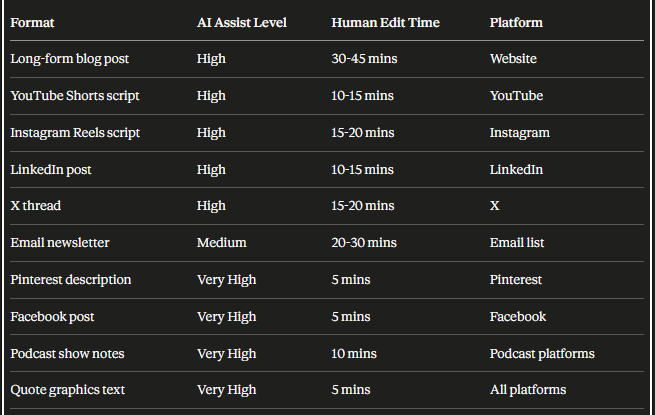
Ten formats from one piece of source content. Total human editing time across all formats: roughly three to four hours. Creating all ten formats from scratch: realistically two to three days of work.
Building the System So It Does Not Collapse Under Its Own Weight
The repurposing workflow above only creates value if it is systematic enough to run consistently without becoming a project management burden.
Three structural decisions that make the difference between a repurposing system that sustains and one that gets abandoned after two weeks:
Decision 1: Batch by source, not by format
Process one piece of source content through all formats before moving to the next piece. Do not run all your blog posts through the blog-to-LinkedIn prompt before doing any Reels. The brief document is already loaded in context. Staying in that context for all formats is more efficient than context-switching between pieces.
Decision 2: Build a prompt library, not a prompt habit
Save the exact prompt that worked for each format as a stored template. The prompt engineering work you do on piece one should not need to be repeated on piece ten. A simple Notion or Google Doc with your tested prompts for each format is the most undervalued productivity asset in this workflow.
Decision 3: Establish a minimum viable distribution standard
Decide in advance which formats are mandatory for every piece of source content and which are optional based on performance signals. A reasonable minimum viable standard for most bloggers: blog post plus one short-form video script plus LinkedIn post plus email. That is four outputs from one source and it is sustainable at a weekly content cadence without overwhelming your editing capacity.
The ROI Calculation
For a blogger publishing one piece of source content per week:
- Without repurposing: one distribution touchpoint per week per channel you are manually present on.
- With this workflow: four to ten distribution touchpoints per week from the same creative effort investment.
The incremental time cost of the repurposing workflow at full implementation is three to four hours per week. The output multiplier is four to ten times. The cost per distribution touchpoint drops by 60 to 80% compared to creating each format independently.
That is the core ROI case for building this into your workflow. Not the technology novelty. The pure efficiency arithmetic.
Would be useful to hear from others here which formats are performing best for your audience right now, and whether anyone has built a more automated version of this workflow using AI agents rather than manual prompt runs.
Tags: AI Content Repurposing, Content Automation, AI Workflow, AI for Blogging, Repurpose Blog Content, YouTube Shorts AI, LinkedIn Content AI, Email Newsletter AI, X Thread AI, Instagram Reels AI, Content Strategy 2026, AI Productivity, One Piece Many Formats, Blog to Social Media, AI Forum, AI Webloggers
Repurposing both old and new content of my blog has helped me reach more people without always starting from scratch. Older posts often contain valuable information, but they can lose traffic over time. By updating them with the latest facts and converting them into formats like LinkedIn posts, short videos, infographics, or forum discussions, they become relevant again.
I also repurpose new content soon after publishing so I can promote it across multiple platforms and attract different audiences. The important thing is not to copy and paste the same content everywhere. Each format should be slightly modified to suit the platform and provide value to readers. AI makes this process much faster, but our own creativity is still what makes the content stand out.
Update:
This post really matches what I’ve been doing with my travel and food blog. I had several old articles about local tourist places and restaurant reviews that were no longer getting much traffic. Instead of leaving them untouched, I used AI to turn them into LinkedIn posts, Facebook updates, short travel tips, and simple image carousels.
I also refreshed the original articles with new photos, updated information, and better SEO. Surprisingly, some of those old posts started getting visitors again. I think repurposing is one of the easiest ways to give quality content a second life without having to create everything from scratch.
Okay the “batch by source not by format” decision is the one I needed to read today lol 😅
I have been doing it completely backwards, running all my posts through the LinkedIn prompt first, then going back for Reels. No wonder it felt slow and messy.
Also the prompt library tip is underrated. I finally started saving mine in Notion last month and it genuinely cut my repurposing time in half just from not rebuilding prompts from scratch every time.
@BotBlogger Your point about old content is spot on too. Repurposing saved posts is basically free traffic waiting to happen.
Tags: AI Content Repurposing, Content Batching, Prompt Library, AI Workflow Tips, Blogging ProductivityHey @VJay,
This post is gold! I’ve been doing something similar with my food blog.
Last month I audit by blog and re-used by old content which is a 4-year-old recipe post about “easy weekend breakfasts.” With AI’s help, I updated the intro, added current tips, and repurposed it into a LinkedIn carousel, 3 Instagram Reels, a Twitter thread, and even a short email newsletter.
The old post was getting almost zero traffic(not SEO optimized, because no AI that time.. 😛), but after repurposing it started getting fresh engagement again. I personally highly recommend all bloggers to go back to old content and repurpose it. It’s like giving it a second life!
Thanks for the detailed guide 🙌